
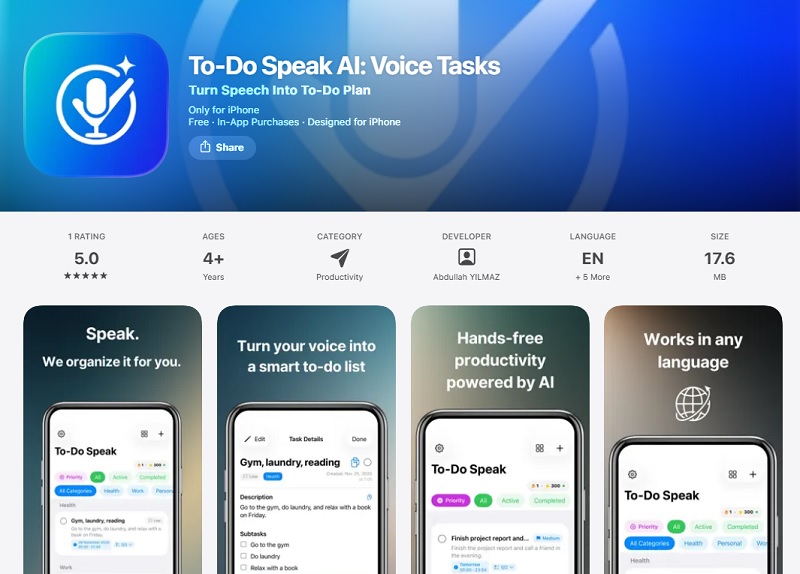

To-Do Speak AI: Voice Tasks stands out in the crowded productivity app space by transforming casual speech into structured to-do lists, eliminating typing for busy users who multitask on the go. Tailored for iPhone users, this lightweight AI tool leverages speech recognition to capture tasks instantly—ideal for drivers, parents, or professionals who think faster than they type. For AI enthusiasts, its natural language processing promises seamless voice-to-action conversion without bloated features.
What is To-Do Speak AI Voice Tasks?
To-Do Speak AI: Voice Tasks is an iOS-exclusive productivity app developed by Fastemy (under Abdullah YILMAZ) that converts spoken words into organized to-do lists. Launched recently for iPhone (iOS 16.6+), it targets hands-free task management, turning rambling voice inputs like “remind me to call mom, buy groceries after gym” into prioritized, editable checklists.
The app’s core technology relies on on-device speech-to-text AI with multi-language support (English, Arabic, Chinese, Spanish, Turkish), focusing on smart parsing to detect actions, deadlines, and categories without complex setup. Unlike general voice assistants, it specializes in daily planning, emphasizing minimalism over endless features to reduce cognitive load.
Key Features
To-Do Speak AI packs essential voice-driven tools into a simple package:
- Voice-to-To-Do Conversion: Tap the mic, speak naturally, and AI transcribes into actionable tasks with automatic grouping and prioritization.
- Hands-Free Capture: Designed for multitasking—record tasks while walking, driving, or cooking, with instant organization into lists.
- Smart Editing and Checkoffs: Edit grouped tasks, mark complete, and build daily routines like morning or evening plans via voice.
- Multi-Language Support: Handles six languages for global users, parsing commands in Arabic, Chinese, Spanish, and more.
- Lightweight Daily Planning: Fast app opens to mic input, creating simple lists without calendars or notifications overload.
- Privacy-Focused Storage: Tracks user content and identifiers locally, with diagnostics not linked to identity.
User Experience
The app’s UI is intentionally minimal: a prominent microphone button dominates the screen, with lists appearing below for quick scans and taps. iPhone optimization ensures smooth performance (17.6 MB size), haptic feedback, and dark/light modes, making it feel native and non-intrusive. No steep learning curve—users speak, review, and done.
Integrations are basic (no explicit calendar sync noted), but its offline-capable voice input shines for solo use. Early feedback highlights speed, though lack of ratings suggests it’s nascent; similar voice apps praise intuitive flows but note occasional transcription tweaks needed.
Performance and Results
Real-world use cases show To-Do Speak AI excelling in quick captures: users report turning 30-second rants into checklists for groceries, calls, or study sessions with high accuracy in supported languages. Comparable voice AI benchmarks indicate strong task completion (75-90% for simple inputs) via natural speech recognition, outperforming typing apps in speed during motion.
No public benchmarks exist yet, but its focus on “messy voice to clear output” mirrors top performers in voice assistant evals, where speaking tasks score higher than complex parsing (e.g., 4.0-4.5/5 on fluency). Students and pros use it for routines, reducing mental overhead effectively.
Pricing and Plans
To-Do Speak AI is free to download with core voice-to-list functionality unlocked at launch. Premium upgrades via in-app purchases enhance unlimited use:
- Monthly Premium: $4.99 – Full access to advanced organization and unlimited tasks.
- Yearly Premium: $39.99 – Best value for ongoing hands-free planning (~$3.33/month).
- Lifetime Premium: $4.99 – One-time buy for perpetual pro features, ideal for light users.
This tiered model offers strong value—free tier suits testing, while lifetime undercuts yearly subs from rivals like Speak AI ($15+/month). No ads or data sales noted, prioritizing privacy.
Pros and Cons
Pros:
- Ultra-simple voice-first design for true hands-free productivity.
- Multi-language support broadens appeal globally.
- Affordable lifetime option and lightweight (17.6 MB) footprint.
- Privacy-respecting with minimal data linkage.
Cons:
- iPhone-only; no Android or cross-platform sync.
- Lacks advanced integrations like calendar/reminders (unlike VoiceTask AI).
- New app with few reviews; transcription may falter in noise.
- Basic features—no AI summaries or subtasks yet.
Best For
- To-Do Speak AI suits voice-centric users in fast-paced scenarios:
- Busy parents/professionals capturing tasks on the move.
- Students building voice-planned study routines.
- Multitaskers (drivers, cooks) preferring speech over typing.
- Global users needing Arabic/Chinese task management.
Final Verdict
To-Do Speak AI earns a solid 8/10 for its niche: a no-frills voice task tool that delivers on promise for iPhone enthusiasts seeking simplicity over bloat. It shines in casual planning but trails fuller suites in integrations; perfect starter for voice AI productivity. Watch for updates adding sync and benchmarks.
Conclusion
To-Do Speak AI redefines to-do apps by prioritizing voice as the primary input, turning speech into stress-free lists for modern life. AI fans should grab the free version to test hands-free magic—upgrade lifetime if it fits your flow. In a typing-fatigued world, speaking your tasks forward is a smart, simple leap.
 Facebook
 LinkedIn
 X
X
 Reddit