
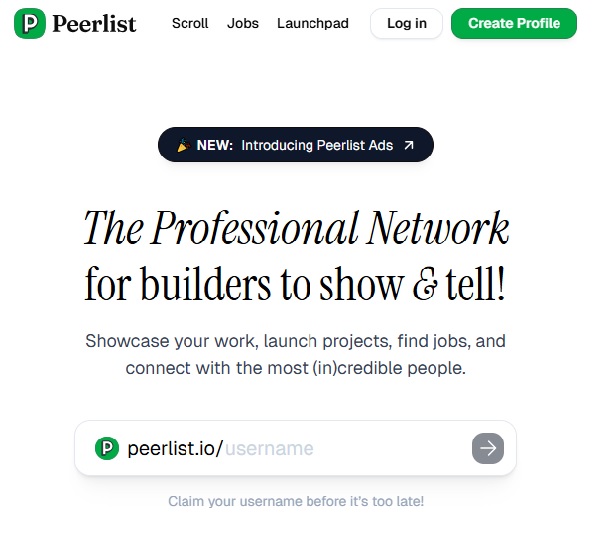

PeerList is a community-led professional network for tech builders, designed to showcase real proof‑of‑work rather than just resumes, which makes it stand out in a crowded professional networking space.
Introduction – Why PeerList Stands Out
PeerList differentiates itself by focusing exclusively on people in tech—developers, designers, product managers, and founders—rather than the entire professional universe. This niche positioning enables higher‑signal interactions, more relevant opportunities, and portfolios that reflect actual shipped work instead of generic job titles.
Instead of optimizing for vanity metrics and broad reach, PeerList optimizes for credibility through verified credentials, integrated portfolios, and community‑driven discovery. For tech professionals evaluating tools to present their work, PeerList functions more like a modern, interactive portfolio and launchpad than a static resume or generic social network.
What Is PeerList?
PeerList is a professional network built specifically for people in tech, where your profile aggregates projects and activity across platforms like GitHub, Dribbble, Product Hunt, blogs, and more. The platform positions itself as “the professional network for builders to show & tell,” emphasizing proof‑of‑work portfolios over long CVs.
The purpose of PeerList is to consolidate a fragmented professional presence into a single, always‑up‑to‑date profile that hiring managers and collaborators can trust. While not primarily marketed as an “AI tool,” PeerList leverages modern web and integration tech, and is increasingly used alongside AI‑driven workflows (e.g., AI‑built projects, AI portfolios) to highlight shipped work rather than just skills claims.
Key Features
1. Unified Proof‑of‑Work Profile
PeerList lets users connect multiple platforms—such as GitHub, Dribbble, Medium, dev.to, personal blogs via RSS, and more—into a single profile. This creates a living portfolio that stays current automatically as you push code, publish articles, or launch products elsewhere.
Because the profile doubles as both a resume and portfolio, you can share one URL when applying for jobs or pitching collaborations, giving reviewers a full view of your work in context. For tech professionals, this reduces friction in showing real artifacts—repos, case studies, designs, and shipped features.
2. Verified Credentials and Credibility Signals
PeerList includes verification for work experience, education, and bootcamps, which boosts trust and reduces the noise common on generalist networks. The vouch system lets you create a list of peers you can personally endorse, adding social proof built on actual relationships rather than generic endorsements.
These credibility mechanisms make it easier for hiring managers and founders to quickly assess whether someone has real experience and shipped work. This focus on proof over popularity is a key part of the platform’s differentiation.
3. Work Showcase, Projects, and Launchpad
Beyond basic profiles, PeerList offers a Projects/Project Spotlight area where you can feature case studies, product teardowns, side projects, and more in rich detail. The Launchpad‑like functionality helps builders launch projects, get feedback from early users, and iterate based on community input.
This turns PeerList into an active “show and tell” environment where you can test ideas, validate concepts, and attract collaborators or early adopters. For AI and dev tool startups, this loop is especially useful for getting qualified feedback from technically literate users.
4. Jobs and Talent Discovery
PeerList includes a jobs layer where tech companies can list roles and search for talent using profiles that already aggregate proof‑of‑work. Because the user base is focused on tech, startups and hiring managers can target more relevant candidates than on generalized platforms.
This also creates a dual value proposition: professionals gain visibility among tech‑focused recruiters, and companies gain access to a pool of candidates with transparent portfolios. Some startup leaders report that evaluating candidates via PeerList profiles simplifies initial screening because all key signals are in one place.
5. Collections and Personal Branding
With Collections, users can curate books, podcasts, videos, and links that reflect their learning interests and professional personality. This adds a softer dimension to profiles, showing how individuals think, learn, and engage with their craft beyond formal credentials.
PeerList also supports using your profile as a personal portfolio website on a custom domain at no extra cost. This effectively replaces a separate personal site for many users, which is attractive for engineers and designers who don’t want to maintain their own CMS.
User Experience – Ease of Use, UI, Integrations
Account creation is straightforward: you can sign up with Google, Twitter, or email and then connect multiple platforms with one‑click connectors. The onboarding flow encourages you to complete at least 70% of your profile before publishing, guiding you through sections like bio, skills, education, social links, and integrations.
The UI is clean, modern, and intentionally minimal compared to legacy networks, with profiles organized around work, projects, collections, and activity rather than noisy feeds. Integrations currently focus on developer and creator tools (GitHub, Dribbble, Medium, dev.to, RSS feeds, etc.), and PeerList also offers mobile apps on iOS and Android for on‑the‑go access.
Performance and Results
Community feedback highlights PeerList’s ability to surface meaningful connections and high‑value interactions, especially among engineers and designers. Users appreciate that the platform avoids low‑signal engagement hacks and instead orients conversations around real work artifacts and shared interests.
By early 2025, PeerList had grown to around 100,000 users—small compared with LinkedIn, but sufficient to form a dense, focused network for tech professionals. For startup founders, this concentrated audience means more targeted discovery of their tools and a higher probability of feedback from people who actually work with similar technologies.
Pricing and Plans
PeerList currently positions itself as a free professional network for individuals, with the core profile and portfolio functionality available at no cost. Users can create profiles, connect integrations, publish projects, and participate in the community without a subscription.
Available public data suggests that pricing is oriented more around custom or organizational use cases rather than metered individual tiers, with references to “Peerlist Custom” for specific needs. Because pricing details are limited and may change, organizations exploring large‑scale or custom usage should verify current options directly with PeerList.
Pros and Cons
Pros
- Tech‑focused network built around proof‑of‑work and verified credentials, which improves signal quality.
- Unified profile aggregating GitHub, design portfolios, blogs, and RSS feeds into a single, always‑up‑to‑date portfolio.
- Strong project and launch capabilities for side projects, product teardowns, and case studies.
- Free use for individuals with optional custom domain support for portfolio‑style profiles.
- Mobile apps for iOS and Android to stay engaged with the community on the go.
Cons
- Smaller user base than mainstream platforms means less reach for non‑tech or broad‑audience networking.
- Limited public information on advanced or paid pricing models may complicate enterprise planning.
- As a relatively young platform, feature coverage and integrations are still evolving compared to mature professional networks.
- Some users mention minor issues with things like email support and location settings in reviews.
Best For – Ideal Users and Industries
PeerList is particularly well‑suited for software engineers, designers, product managers, data scientists, and technical founders who want their work—not just job titles—to define their professional identity. It is also a strong fit for early‑stage startups building developer tools or technical products who need access to a community that understands APIs, code quality, and UX rigor.
Recruiters and hiring managers in tech can benefit from PeerList by sourcing candidates whose portfolios are already curated and verified, reducing screening overhead. Conversely, organizations with mostly non‑technical roles or highly traditional hiring processes might see limited incremental value compared with generic professional networks.
Final Verdict – Overall Rating and Insights
From a tech professional’s perspective, PeerList is a high‑signal, portfolio‑centric alternative to traditional professional networks, optimized for builders and makers. On a 10‑point scale, a balanced rating would be around 8/10: excellent for tech‑focused personal branding, project showcasing, and targeted networking, with room to grow in scale, integrations, and clarity around advanced pricing.
If your primary goal is to present a credible, centralized proof‑of‑work profile and connect within the tech community, PeerList is a compelling choice. If you need mass‑market reach, multi‑industry recruiting, or complex enterprise features, you will likely treat PeerList as a complementary tool alongside LinkedIn or other systems.
Conclusion – Key Takeaways and Recommendations
PeerList reframes professional networking for tech by centering portfolios, verified credentials, and community engagement rather than generic profile pages. Its strengths lie in unified proof‑of‑work profiles, project launch support, and a focused community that understands technical products and careers.
Recommendations for tech professionals: use PeerList as your primary public portfolio link, connect your core platforms, and actively share projects to benefit from feedback and discovery. For startups and hiring teams, incorporate PeerList into your sourcing and employer branding mix to tap a curated pool of builders, while maintaining broader channels for non‑technical or large‑scale hiring.
 Facebook
 LinkedIn
 X
X
 Reddit