
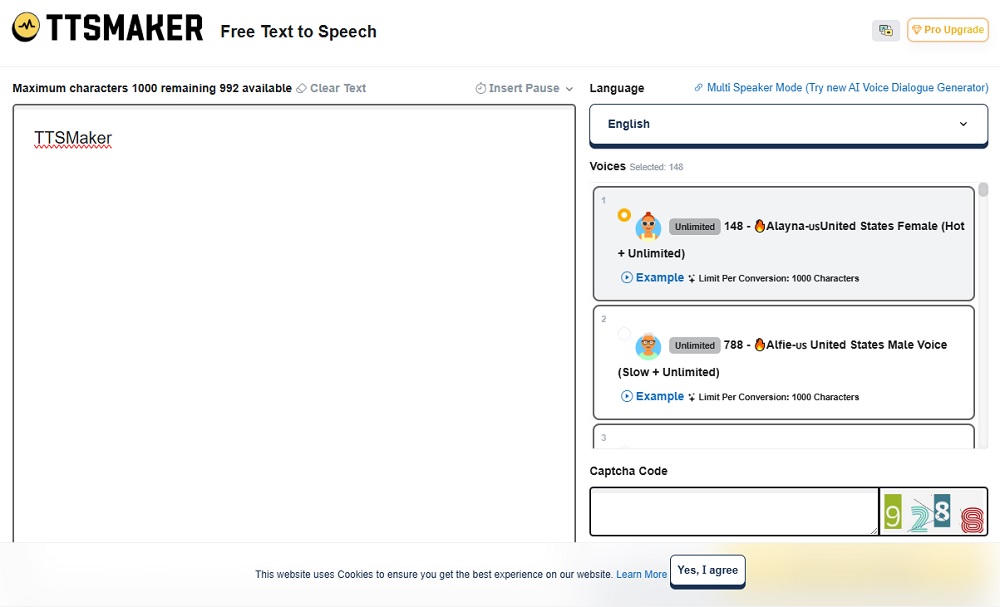

TTSMaker has become a go‑to option in the AI text‑to‑speech space because it offers a genuinely usable free tier with commercial rights, support for 100+ languages, and hundreds of neural voices—all accessible in the browser. For tech professionals, it is an attractive balance of low friction, broad language coverage, and an upgrade path to a more powerful Pro stack when workloads grow.
Introduction – Why TTSMaker Stands Out
Many TTS services either restrict commercial usage on free plans or cap usage so tightly that serious evaluation is difficult; TTSMaker instead provides up to 20,000 characters per week free, unlimited downloads, and explicitly allows commercial use of generated audio. Combined with 100+ languages and 600+ AI voices, it becomes a practical tool for YouTube creators, educators, and small businesses rather than just a demo.
Its Pro offering then layers on advanced speech controls, emotional tones, and API support, giving technical teams room to scale without leaving the ecosystem.
What Is TTSMaker? – Purpose and Technology
TTSMaker is an online text‑to‑speech platform that converts written text into natural‑sounding speech in multiple languages, with downloads in MP3 and WAV formats. The core purpose is to provide a simple, browser‑based way to generate high‑quality voiceovers for videos, podcasts, audiobooks, training content, and accessibility without installing software or paying upfront.
Technically, TTSMaker uses advanced neural network synthesis to model human intonation and emotion, enabling more lifelike speech than traditional concatenative or parametric TTS. Its engine supports multiple emotional styles (happy, sad, angry, etc.), multi‑speaker dialog, and fine‑grained control over speed, pitch, volume, and pauses.
Key Features – Core Capabilities
1. Extensive Languages and Voices
TTSMaker supports over 100 languages and dialects, with 600+ AI voices across male, female, and child options and a variety of accents. This breadth makes it suitable for global user bases and localization projects.
2. Emotional and Styled Voices
Many voices provide emotional variants—cheerful, sad, angry, excited—which allow creators to match tone to context (e.g., explainer vs storytelling). Pro‑tier voices add richer emotional controls and speaking styles, improving expressiveness for marketing and narrative content.
3. Multi‑Speaker and Dialog Mode
A multi‑speaker mode lets users assign different voices to different parts of a script, effectively generating dialog between characters or instructors. This is valuable for e‑learning, drama, role‑play training, and audio stories.
4. Advanced Audio Customization
Users can adjust speech rate, pitch, and volume, and insert custom pauses (up to 50 per conversion on Free, up to 300 on Pro) to control pacing. Pro users get an advanced editor with “Say As,” emphasis tags, and richer SSML‑style configuration for precise control.
5. Hosting, Sharing, and Background Music
Beyond raw generation, TTSMaker Pro supports MP3 hosting, shareable links, and background music mixing, so voiceovers can be distributed or embedded without separate hosting. This reduces tooling overhead for simple landing pages, course platforms, or internal portals.
User Experience – UI and Integrations
The standard workflow is straightforward:
- Enter text (up to 1,000 characters per conversion on Free, higher on Pro).
- Select language and voice.
- Click “Convert to Speech” and wait for generation.
- Listen online or download MP3/WAV.
The browser UI exposes key settings (rate, pitch, volume, pauses) without requiring SSML, which is helpful for non‑technical users. For tech professionals, Pro and Studio tiers add an API, allowing integration into custom apps, pipelines, and automation flows.
TTSMaker does not offer as broad an ecosystem of no‑code integrations as some competitors, but its API, hosting, and simple web endpoints are sufficient for many bespoke or scripted workflows.
Performance and Results – Quality in Practice
External reviews describe TTSMaker’s output as high‑quality and natural‑sounding, especially for major languages like English, Spanish, French, German, Chinese, and Japanese. Neural synthesis and emotional styles help avoid the “robotic” cadence common in older engines, and processing speed is generally described as rapid, particularly for shorter scripts.
For free users, the 20,000‑character weekly quota (roughly 30–40 minutes of audio, depending on speed) is sufficient for testing or light production. Pro and Studio plans raise this ceiling into hundreds of thousands or millions of characters per month, which external reviewers recommend for YouTube channels, audiobooks, and training libraries.
Pricing and Plans – Free vs Paid Value
TTSMaker uses a freemium, character‑based model. Key elements include:
Free plan:
- $0, 20,000 characters per week, up to 1,000 characters per conversion.
- 600+ voices, 100+ languages, unlimited downloads, ~30 minutes of conversion history.
- 20+ “unlimited” voices with no character cap and up to 50 pause insertions.
- Commercial use allowed for all generated audio.
Pro plan (TTSMaker Pro):
Around £19.99/month (annual) or £29.99/month, with 1,000,000 characters/month and >20,000 characters per conversion.
Advanced editor, emotional controls, more pauses, no ads/captcha, longer history, hosting/BGM tools, API access, priority support.
Studio plan:
Approximately $108–140/month annualized, 6,000,000 characters/month plus all Pro features and higher limits.
This structure offers good value: even Pro’s 1M characters (~23 hours of audio) is competitively priced against other commercial TTS platforms.
Pros and Cons – Balanced Summary
Pros
- Generous free plan with commercial rights and unlimited downloads, suitable for small projects and evaluation.
- Broad language and voice coverage (100+ languages, 600+ voices) with emotional styles and dialog support.
- Fine‑grained control over rate, pitch, pauses, and emphasis, especially in Pro’s advanced editor.
- API, hosting, and background music features make it usable in production systems and content workflows.
Cons
- Character quotas and per‑conversion limits require planning for long‑form content on Free; Pro or Studio is almost mandatory for audiobooks and large MOOC catalogs.
- Documentation and branding are less polished than some enterprise‑first TTS vendors, which may matter for large organizations.
- No published MOS or latency benchmarks; technical teams must run their own quality and performance evaluations.
Best For – Ideal Users and Use Cases
TTSMaker is particularly well suited to:
- YouTube and social creators who need cost‑effective voiceovers for tutorials, explainer videos, and shorts.
- Educators and e‑learning teams producing multilingual lessons and training modules where free commercial use is attractive.
- Indie developers and small businesses needing narration for apps, marketing videos, and landing pages without complex integrations.
- Enterprise users can leverage Pro/Studio with API access, though they may still compare it against larger cloud providers for SLAs and compliance.
Final Verdict – Overall Rating and Insights
From a tech‑professional perspective, TTSMaker delivers a strong balance of accessibility, capability, and cost, especially for small to mid‑scale workloads. On a 5‑point scale, it reasonably sits around 4.2–4.4: excellent for free and Pro‑tier use cases, with limitations mainly around documentation polish, enterprise assurances, and the need to manage character quotas.
Its combination of commercial‑friendly free usage, wide language support, and advanced controls makes it a credible primary solution for many creators and a useful backup or comparison point in more complex TTS stacks.
Conclusion – Key Takeaways and Recommendations
TTSMaker is a capable AI text‑to‑speech platform that distinguishes itself with a generous free tier, 100+ languages, 600+ voices, and explicit commercial rights, backed by a Pro line that adds emotional control, an advanced editor, and API access. For tech professionals, it is worth piloting on representative workloads—such as a batch of videos, lessons, or IVR prompts—while tracking character usage, perceived quality, and integration effort.
If TTSMaker meets quality expectations and the economics work at your scale, Free or Pro can serve as a cost‑effective core TTS solution; otherwise, it still functions as a valuable secondary engine for multilingual coverage, backup generation, or experimentation.
 Facebook
 LinkedIn
 X
X
 Reddit