
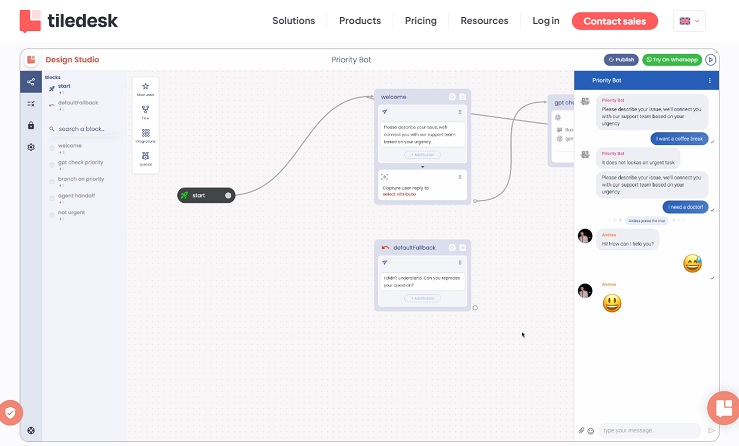

Tiledesk is an all-in-one, no-code, and open-source customer engagement platform that offers omnichannel live chat and AI-powered chatbot solutions. It is highly regarded for its ability to automate customer support, enhance lead generation, and streamline customer interactions across various digital channels. With a strong emphasis on ease of use, customization, and competitive pricing, Tiledesk caters to businesses of all sizes, from freelancers and startups to large enterprises. The platform leverages AI, including ChatGPT, to provide human-like, intelligent responses, while also incorporating a “human-in-the-loop” escalation for complex issues. Tiledesk has received positive reviews for its functionality, value for money, and robust community support.
1. Main Themes and Key Ideas
1.1 Conversational AI and Automation (No-Code & LLM-Powered)
Tiledesk’s core strength lies in its no-code chatbot builder and its integration with Large Language Models (LLM), notably ChatGPT. This empowers users to “effortlessly combine engagement rules and AI capabilities, bringing their desired conversation designs to life” without requiring any coding skills.
- Ease of Creation: “Tiledesk is an innovative platform revolutionizing the way chatbots and conversational apps are created, all without requiring any coding skills. With our intuitive visual builder, users can effortlessly combine engagement rules and AI capabilities.” (GetApp)
- AI-Powered Responses: The platform “leverages the power of ChatGPT to generate LLM-powered responses that are human-like.” (Capterra) Users can “train your chatbot in minutes using your own data and integrate it with ChatGPT to provide accurate and human-like responses.” (G2)
- Automation of Tasks: Chatbots are used to “automate common queries and support flows across web, mobile, WhatsApp, etc.” (Tiledesk Blog) and to “automate customer inquiries and product recommendations.” (Capterra review)
- Lead Qualification: Tiledesk “automates lead qualification processes, ensuring that your sales team focuses on high-quality leads, resulting in improved conversion rates and increased online sales.” (GetApp)
- Efficiency and Cost Savings: “Resolving repetitive customer inquiries that are quite costly in terms of Customer Support teams’ time, in a very ‘human’ way for the customer, that doesn’t feel stuck in the usual chatbot decision tree.” Another user noted, “I was able to shrink the team by 50% because of the solution they provided.”
1.2 Omnichannel Customer Engagement
Tiledesk facilitates seamless customer interactions across a multitude of digital channels, ensuring a consistent and unified experience.
- Multi-Channel Support: “Simplifying lead generation and enhancing customer excellence, Tiledesk seamlessly integrates across various digital channels, including websites, WhatsApp, mobile apps, Facebook Messenger, and more.” (GetApp)
- Unified Messaging: The platform offers a “unified messaging service” (GetApp review) and allows users to “manage multiple communication channels through single messaging platform.” (Capterra review)
- Conversational Commerce: Tiledesk “empowers businesses with the benefits of conversational commerce across all digital channels,” enabling “personalized interactions, instant customer support, and real-time product recommendations.” (GetApp)
- Key Integrations: Tiledesk integrates with popular platforms like WhatsApp, WordPress, Zapier, Rasa, Twilio, Wix, Shopify, HubSpot CRM, Stripe, Brevo, Joomla, PrestaShop, Customer.io, Messenger, and Dialogflow. (GetApp, Capterra, Software Advice, Tekpon)
1.3 Open-Source and Flexibility
Tiledesk distinguishes itself through its open-source nature, offering unparalleled flexibility and control, particularly for developers and businesses prioritizing data privacy.
- Open Ecosystem: “Our platform provides an open ecosystem for conversation designers and chatbot developers, fostering collaboration and knowledge sharing.” (GetApp)
- Customization and Control: “The project’s open-source nature has allowed me to fully customize and integrate it into my application with ease. The flexibility and adaptability of the project have been a major advantage.” (Capterra review)
- On-Premise Deployment: “It’s open-source and it can be both on cloud or your own infrastructure.” (Product Hunt) Users have the “option to install the software on premises, on your own servers, which gives full control over the software.” (Capterra review)
- Community-Driven: Tiledesk benefits from a “thriving community of like-minded professionals” (GetApp) and promotes “standardization and fosters collaboration among developers worldwide.” (Tekpon)
1.4 Comprehensive Customer Support Features
Beyond chatbots, Tiledesk provides a robust set of tools for managing and optimizing customer support operations.
- Live Chat: A fundamental feature, described as “exceptionally efficient and customizable” and instrumental for “24/7 assistance and invaluable data insights.” (Capterra review)
- Help Desk & Ticketing: Features a “robust ticketing system that allows businesses to organize and prioritize customer inquiries efficiently.” (Software Advice) It includes “Support ticket management” (GetApp) and a “Ticketing Management system fully integrated into the platform and instant conversation flow.” (G2)
- Human Handoff (Hybrid AI-Agent): “When faced with complex issues, the AI agent seamlessly transfers the conversation to a human agent for further support.” This combines “powerful AI-driven agents with human-in-the-loop escalation.”
- Knowledge Base: Businesses can “create a comprehensive knowledge base within Tiledesk, providing customers with self-service resources such as FAQs, tutorials, and troubleshooting guides.”
- Team Organization: Includes “multi-project management, SLAs setting, smart assignment of the queues, departments organization and much more.”
- Analytics and Reporting: Offers “real-time analytics and reporting capabilities, providing businesses with valuable insights into customer support performance.” (Software Advice) Key features include “Reporting/Analytics” and “Real-Time notifications.”
2. Key Facts and Figures
- Overall Rating: Consistently high, with an average of 4.6/5 stars across various platforms (GetApp, Capterra, Software Advice) and 4.8/5 on G2, 5.0/5 on Product Hunt, and 4.3/5 on Trustpilot.
- User Sentiment: Highly positive, with 97% positive reviews on Capterra and 93 five-star reviews out of 153 on GetApp.
- Pricing: Starts from €15 per feature/per month. Offers a “Free Forever” plan with basic features and a 14-day free trial. Premium plans are €100/month, and Enterprise plans are custom-priced.
- Typical Users: Freelancers, Small Businesses, Midsize Businesses, Large Enterprises, Public Administrations.
- Top Industries: Information Technology and Services, Computer Software, Management Consulting, Financial Services, Telecommunications.
- Awards: Recognized as “Top AI Agent Software by Tekpon for Q2 2025” and “Top Live Chat Software for Q2 2024” by Tekpon.
- Supported Platforms: Web, Android, iPhone/iPad, Desktop (Mac, Windows, Linux, Chromebook), and On-Premise.
- Supported Languages: English, French, German, Italian, Portuguese, Russian, Spanish, Turkish, Serbian (Cyrillic), Arabic, Kazakh, Swedish, Ukrainian, Chinese (Simplified), Croatian.
3. Strengths
- No-Code Simplicity: Extremely easy to use with a drag-and-drop visual builder, making it accessible for non-technical users.
- Advanced AI Integration: Powerful chatbots enhanced by LLMs like ChatGPT provide intelligent, human-like responses and automate complex tasks.
- Omnichannel Capabilities: Unifies communication across websites, mobile apps, WhatsApp, Facebook Messenger, email, and more.
- Open-Source Advantage: Offers flexibility, customization, and data privacy, appealing to developers and businesses needing unique solutions.
- Comprehensive Feature Set: Includes live chat, help desk, ticketing, knowledge base, team management, lead qualification, and real-time analytics.
- Competitive Pricing: Offers a free plan and flexible subscription models, providing good value for money.
- Strong Community and Support: Praised for responsive customer service and an active community for knowledge sharing and templates.
4. Areas for Improvement (Cons and User Feedback)
- Mobile App Functionality: Some users report the Android/iOS app is “very basic and reliably lacks push notifications.”
- UI/UX Refinement: “Some of the visual/UI flows may seem awkward to navigate. It’s unclear whether this is due to a lack of refinement or intentional design.” Another noted, “There are a handful of visual/UI flows that feel somewhat cumbersome.”
- Integration Gaps: While many integrations exist, some users desire “more integration options” or specific integrations like Flutter SDK. Some advanced features and integrations are only available in paid plans.
- Deployment Complexity: Installing on cloud platforms like Azure can be challenging, with one user reporting difficulty making the widget work.
- Documentation for Advanced Features: While basic documentation is clear, “it could be improved in offering more examples or use cases for advanced functionalities.”
- Occasional Bugs/Lag: Some users have noted “lag that can occur when using it” or that the “platform can result a bit bugged, because sometimes they launch new features probably before testing them totally.”
- Customization Limitations: A few users mentioned “limited customization options” in certain chat box features or the layout.
- Lack of Admin UI for Tenants: One product owner mentioned the “absence of an admin UI to control and manage the different tenants.”
5. Alternatives Mentioned
- Birdeye
- Intercom
- Attentive
- LiveAgent
- Freshchat
- Zendesk Suite
- Gladly
- Tidio
- ChatGPT (as a comparison point for AI)
- WATI
- Smartsupp
- Drift
- Comm100 Live Chat (switched from due to pricing)
- Chatwoot (considered for open-source, but worse bot support)
- Chaskiq (smaller company, less track record)
- Google Chat
- HappyFox Chatbot
- Crisp
- Office Chat
- Sendbird
- Zoho Desk
- Slack
- ManyChat
- Chatbase
- Botsonic
- Velaro
- WhatsApp (as a separate tool)
- Rasa
- Dialogflow
6. Conclusion
Tiledesk presents itself as a powerful, user-friendly, and cost-effective solution for businesses aiming to modernize their customer engagement strategies through conversational AI and omnichannel communication. Its no-code approach, strong AI capabilities (especially with ChatGPT integration), and open-source flexibility are significant differentiators. While there are some minor points of feedback regarding mobile app experience, UI refinement, and advanced deployment, the overall sentiment highlights Tiledesk as a highly effective tool for automating customer support, qualifying leads, and fostering stronger customer relationships. Its continuous development and responsive support indicate a promising future in the conversational AI landscape.
 Facebook
 LinkedIn
 X
X
 Reddit